Picture Monday morning. Two vans pull into the same client parking lot, and both drivers are your techs. The manager scheduled both from memory, and memory lost. You spend the next hour on apologies and a ticket that now has two names on it and no one accountable.
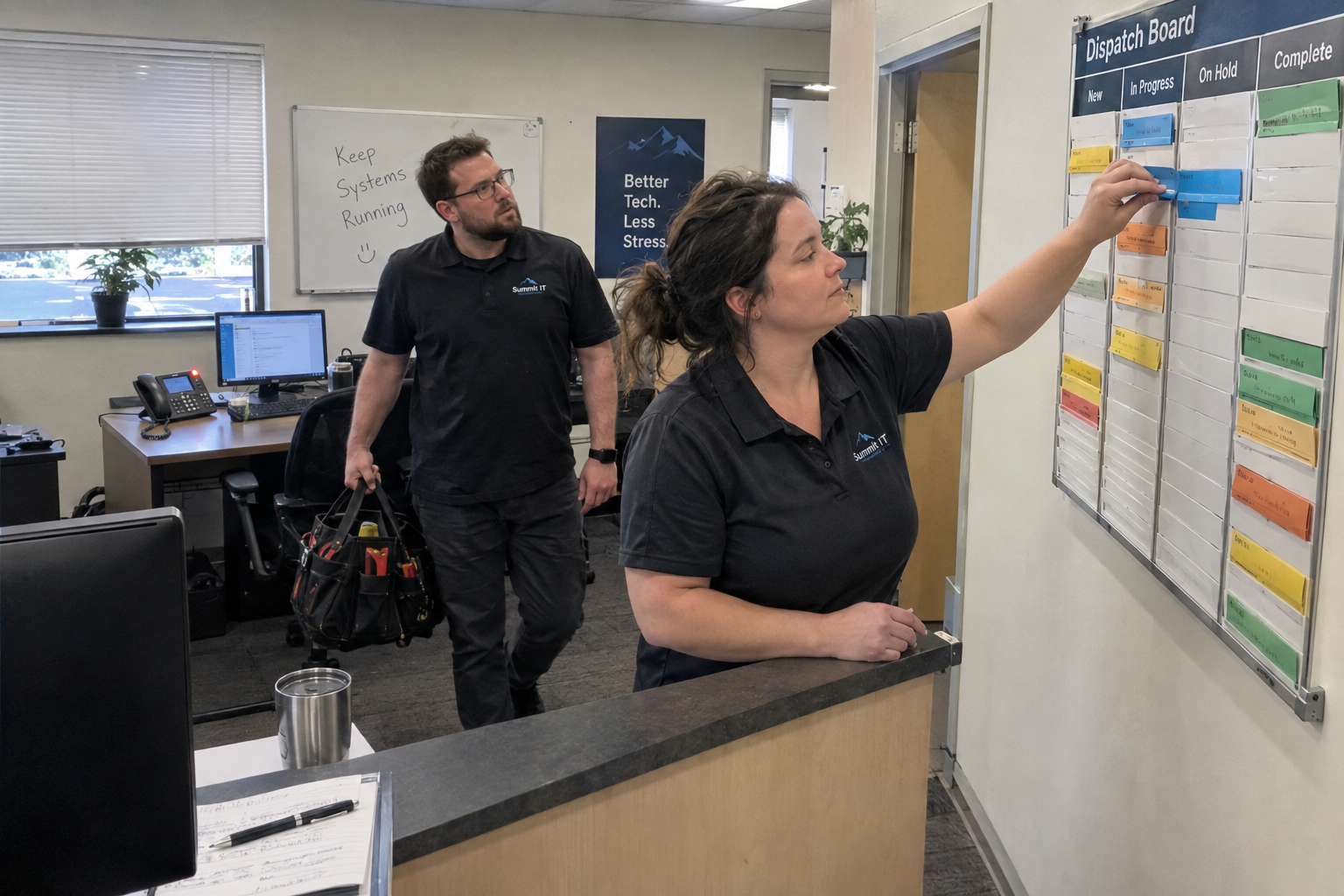
The fix is a single, always-open dispatch board that shows every tech's load, plus a booking rule: any site already on someone's column is off-limits. That's it. No new software required, and you can have it running before lunch if the discipline holds.
The Morning Both Techs Get the Same Ticket
Say you run a shop of 15 people. Your tech Maria books the Acme site for Monday. David checks the board before he drives, sees Acme is taken, and moves to his next job. No phone call, no argument, no second van in the lot.
That's the whole point of the board. It turns scheduling from something one person holds in their head into something everyone can see. The board is the single source of truth, and checking it before driving is a habit you build, not a switch you flip.
A Board That Shows Every Tech's Load at Once
The layout is simple: one column per tech, each column holding that tech's booked site visits for the day, week, or month. Color-code urgent versus scheduled, and you get the whole day at a glance.
Maria's column has a card for the Acme VPN fix at 10am and a card for the Beta server upgrade at 2pm. David's column has a card for the Gamma password reset. You see who's busy, and you see who has gaps to take an emergency ticket.
A shared spreadsheet or a kanban board works fine. The tool matters less than the rule that makes it work.
The Booking Rule That Ends Double-Coverage
Here's the rule, and it's one sentence: before any tech drives to a site, they check the board; if that site already appears in any tech's column, they do not book it, and if they accidentally create a duplicate, they call the dispatcher immediately.
A week later, Maria gets a request for Acme and sees David's column already has the site because he booked a follow-up. She doesn't book it or drive. She calls the dispatcher to clarify who handles it. One call, no wasted trip.
One caution: if a site has multiple visits from different techs in the same day, a per-day rule isn't enough. You need a per-time-slot rule, where each card is for a specific time and a site can appear multiple times as long as the slots don't overlap.
Who Owns the Board When the Dispatcher Is Out?
Appoint a trained backup dispatcher. That's a person with board access who follows a written playbook covering morning checks, ticket routing, and conflict resolution.
When your dispatcher takes a week off, their backup, say David, starts each day by reviewing the board, confirming all bookings match the ticket queue, and re-routing any new onsite requests to a tech with an open gap.
The playbook should cover what to check in the morning, how to assign tickets from the queue, and how to resolve a conflict when two techs are at the same site. Give the backup edit access and a clear escalation path.
When the Board Stops Being the Source of Truth
This practice fails when it's treated as an add-on rather than the core scheduling habit. The signs are easy to spot: techs stop updating the board, the board isn't the single source of truth because someone still uses their personal calendar, or a site has multiple visits from different techs on the same day and the per-slot rule isn't being followed.
There's also a failure mode that's easy to miss: a stale card. If Maria forgets to remove a completed job, David sees the site as taken and cancels a needed visit. He fixed a double-book but created a missed visit. The board only earns its keep if it's maintained.
Monday's First Step: Get the Board in Front of Your Team
On Monday, create a simple shared spreadsheet or use your PSA's scheduling view. Put every tech in a column. Add the booking rule to your team chat. Put the board on screen in the morning huddle, and have the dispatcher verbally confirm the two most important booked sites for the day.
And phase the rollout. Don't roll out every feature of your PSA or automation tool at once. One MSP that did saw its helpdesk blow up and had to redo the rollout in phases, focusing on one sticking point at a time. Start with one rule and one pilot team of two or three techs. Observe for two weeks, collect feedback, then expand.
That's the whole plan. A board, a rule, a backup, and a phased start. It won't solve every scheduling problem, but it will stop the two-vans-in-one-parking-lot Monday, and that's a good place to begin.

mspoutpost.com/articles/build-a-dispatch-board-that-stops-two-techs-driving-to-the-same-site
Written by Megan Friesen
MSP Outpost publishes information, not legal, financial, insurance, tax or compliance advice, and reading it creates no professional relationship. For decisions about your business, talk to a qualified professional.